
Conversational customer service is support where the customer writes in plain words and every reply uses the earlier messages. A SaaS user who writes “I reset my password and I am still locked out” gets the next step in one message. A shopper who asks “where is my order?” at 2 a.m. gets the tracking status. An AI agent reads the account or the order and replies. A person on your team stands behind it and takes any case that needs a decision.
It works in live chat, email or a messaging app. Software teams use it for login, billing and how-to questions. Stores use it for order status, returns and product questions. Good customer service skills still matter, because a person takes every case the AI agent hands off.
What conversational customer service looks like
Here are two typical chats, one from a SaaS product and one from an online store.
Neither customer gave an ID or an order number. The AI agent matched the email address on the chat session, or the logged-in account, to the account or the orders. It asked one short question to be sure. Each chat ended with a next step.
With a shared inbox, the history from every channel stays in one place, so a customer can start in chat and finish by email without repeating anything.
What is conversational AI
Conversational AI is software that reads and writes natural language. A conversational AI agent uses it to answer customer questions and to act on them, inside limits you set. It reads your help articles, policy pages and account or order data, works out what the customer means and writes the reply. Three examples:
- “Which plan am I on?” The agent reads the account and names the plan and the renewal date.
- “Does this jacket run small?” The agent answers from the size chart on the product page.
- A refund request on worn boots, or a charge dispute on a renewal. The agent cannot decide that, so it tells the customer a person will review the case and passes the chat, with the order or account, to your team.
Conversational customer service is the way of working. Conversational AI is one tool for it, next to human agents. When people say “conversational AI customer service”, they mean this mix: the AI agent answers first and a person takes the rest. For background on the technology, read the guide to AI in customer support.
How conversational support works
Every conversational exchange follows four steps.
- The customer writes a message. “Where is my stuff?” and “Has my parcel shipped?” mean the same thing, and the system treats them alike.
- The system finds the intent and the source that holds the answer. The source can be a help article, a policy page or live account or order data.
- It replies. If the question is vague, it asks one short question first.
- It acts or hands off. It can look up an order or an account, or start a return. If the case needs judgment, it passes the full conversation to a person.
The answers are only as good as your content. A vague policy gives vague answers, from a person or an AI agent. Good AI training starts with a clear knowledge base.

Conversational support vs chatbots and scripted support
A scripted chatbot offers buttons and keywords on a fixed path. It works for one narrow job, such as sending a tracking link or a password reset link. It fails when the customer types something the script doesn’t expect.
Chatbot self service means the customer uses a bot or a help center alone. It answers only what is scripted or written. Conversational support also answers first without a person, but it reads the question, asks a follow-up and hands off when needed. Customer self service is the broader idea: customers solve problems without contacting you.
| Feature | Scripted chatbot or form | Conversational support |
|---|---|---|
| Understands free-form questions | Only listed keywords | Yes, in the customer’s own words |
| Remembers context | No, each step stands alone | Yes, across the whole conversation |
| Asks follow-up questions | Only if scripted | Yes, when the question is vague |
| Takes actions | Fixed links and forms | Can look up an order or account, or start a return |
| Handles new questions | Dead end | Answers from your content or hands off |
| Setup effort | Write and update every path | Prepare clear content and rules |
| Typical failure | Loop with no way out | Wrong answer from weak content |
A single-purpose form, such as a return label request, can still be faster than a chat when the customer knows what they want. Use the form for that one job and let conversational support take every other question. One entry point is simpler for the customer and for you.

What happens on a spike
A spike shows the difference. Say a store emails a sale at noon, and chats jump from 5 an hour to 60. Or a SaaS team ships a release with a bug, and 60 users write in about the same error. With people only, customers queue and the team repeats one answer for hours. With an AI agent first, each chat gets an answer at once, such as the stock date or the known issue and its workaround. The team takes the cases that need a decision.
Speed does not remove the need for a person. Gartner asked customers about AI in service in two surveys. In the 2024 survey, 64% of customers said they would prefer that companies did not use AI in customer service. In the 2025 survey, 51% said they would use a GenAI assistant to deal with service on their behalf.
| Item | Share of customers |
|---|---|
| Prefer companies did not use AI in service (2024) | 64% |
| Would consider switching brand over AI use (2024) | 53% |
| Would use a GenAI assistant on their behalf (2025) | 51% |
Source: Gartner customer survey, July 2024 (64% and 53%); Gartner survey of 4,879 customers, January and February 2025 (51%)
Many customers distrust AI, so make the path to a person easy to see in every chat. Put a “Talk to a person” button in the chat window from the first message, not in a menu.
Two small teams, before and after
These figures are hypothetical. A store has two people on support and gets 40 chats a day. About 28 ask about order status, delivery time or the return window. A SaaS team of three gets 30 chats a day. About 20 are password resets, invoice copies and how-to questions.
Each team writes the pages first: a returns and shipping page for the store, one help article per repeat question for the SaaS team. Then each connects its tools and trains the AI agent on the pages.
After, the agent answers most of the repeat chats. The inbox gets the rest: refunds, damaged goods, bugs, plan disputes and angry messages, each with the full thread and a named owner. Each month the team fixes gaps in the pages.
Where SaaS teams and online stores use conversational support
SaaS and software teams
- Login and account access. The agent explains a lockout and sends a reset link.
- Billing and subscription changes. The agent names the plan and the renewal date. A person takes refunds, charge disputes and plan changes.
- Bug reports and outages. The agent gives the status and a known workaround. A new bug goes to your team with the user’s steps.
- Onboarding and how-to questions. The agent answers from your help center and links the article.
- Feature requests. The agent logs the request in the ticket, so a person can count and tag it.
Purchase and license data comes from tools such as Freemius or SureCart. See the SaaS support page.
Online stores and retailers
- Order status and delivery. The agent reads the status and the tracking number from your store and replies with the tracking page. Hand off any parcel the carrier marks as lost.
- Returns and refunds. Put the return window in one clear sentence on your policy page. The agent quotes it and checks the order date. A person takes the refund.
- Pre-sale product questions. Will this charger fit my phone? The agent answers from your product pages, so add a size chart and a materials list before launch.
- After-hours messages. If the agent has no answer, it asks for an email address and opens a ticket for the start of the day.
- Failed payments and wrong addresses. The agent sends the shopper to the checkout page and never asks for card details in the chat. For a shipped order with a wrong address, a person contacts the carrier.
Order data comes from Shopify or WooCommerce. See the eCommerce support page.
Who answers the customer
Human agents
Best for a team with low chat volume. A person types each reply, so more volume needs more people. Saved replies make common answers take seconds.
AI agents
Best for a team with steady repeat questions and good help articles. A conversational AI agent can also act, for example look up an order or an account, if you switch that action on. It needs clear sources and a clear handoff.
AI first, with a person behind it
Best for most small teams. The AI agent answers first and a person sits behind it. When the AI agent cannot settle a case, escalation to people passes the full conversation to your team, so the customer does not repeat anything. ThriveDesk’s AI agent, Neo, works this way. A help desk adds a record of the ticket, the history and the owner, so an unsolved chat becomes a ticket with one named owner.
What can go wrong
Wrong answers are the main risk. They come from weak or outdated content, and the AI agent states them in the same calm tone as correct ones. When a reply is wrong, fix the help article or policy it came from, not only the reply, or the same error returns.
A customer who cannot reach a person gets stuck, so show a way to reach your team in every chat.
Privacy needs care too. Treat chats like customer records, and ask the vendor where it stores them, for how long and how you delete them.
Check which actions you can switch on. Start with read-only actions such as an order or account lookup, and keep refunds, plan changes and address changes with a person. Give the AI agent a rule to refuse card numbers and passwords. Step 3 below shows where to add it.
AI agents and how to choose conversational support software
AI agents now take routine support work
AI agents are taking over routine support operations. They answer order, account and policy questions, so your team does less manual work. Two of the numbers below are predictions, not results.
30-45%
of current customer care function costs could be gained as productivity value from generative AI
McKinsey Global Institute analysis, 2023
70%
of customers will start their service journey with a conversational AI interface by 2028 (prediction)
Gartner
80%
of common service issues resolved by agentic AI without a person by 2029, with 30% lower operational cost (prediction)
Gartner, March 2025
A prediction can miss. Still, the first reply will come from an AI agent more often. So ask which product you can trust with your customers.
Cheap vibe-coded software
Tools that generate apps in an hour have made it easy to ship a “support platform” over a weekend. Vibe-coded software is an app built fast with AI coding tools and shipped without real engineering, testing, security review or support. It can look fine in a demo.
It is bad for a business because the failures show up in front of customers:
- It can go down on your busiest day, when a sale or a release fills the chat.
- Chats hold names, addresses and account or order details, and a weak build can leak them.
- It may have no data export, and the vendor can disappear.

Check these signs before you buy:
- Age of the company. A start date you can verify, and a record of shipping updates.
- Status page. A public status page with past incidents. A vendor that hides incidents will hide them from you too.
- Changelog. A dated history of changes over months and years.
- Security. Two-factor sign-in and a clear statement on where chats are stored.
- Data export. A named format and a way to run it yourself.
- Real support team. Send a real question and see who answers, and how fast.
ThriveDesk has run since 2021, which is more than five years. It has an established customer base, a team that engineers and maintains it, and a public changelog. It is not vibe-coded, and it handles large support loads.
Eight questions to ask before you buy
The software answers your customers in your name, so a bad choice shows up in front of them. Ask these eight questions, and write down each answer.
| Question | What a good answer looks like |
|---|---|
| Does the AI agent share your help desk inbox? | The AI agent and your team use the same inbox, customers and history. A separate bot creates a second history that your team cannot see. |
| What does the person receive at handoff? | The full conversation, the customer’s orders or plan and a note on why the AI agent stepped aside. A blank thread is a bad answer. |
| Which channels does it cover? | Live chat, email and the messaging apps your customers use, all in one inbox. |
| Does it connect to your tools? | It reads orders from your store platform, such as Shopify or WooCommerce, or plans and purchases from your billing and product tools, so the agent answers with real data. |
| What does the AI agent learn from? | Your help center, policy pages and files, with sources you can see. |
| How long has the vendor run, and does it publish uptime? | A start date, a customer base you can check and a public status page with past incidents. |
| What happens on your busiest day? | The vendor names its load limits and says how it handles a spike. |
| Can you export your data? | The vendor names the format, for example CSV, and says who can run the export. |
Ask for a trial and run your own ten most common questions through it, including one that has no answer in your content. A good AI agent says it does not know and hands off. A weak one invents a reply. If the vendor can’t name its load limits, treat that as a warning. For a ranked list, read our guide to the best AI chatbots for customer support.
What to measure
Track these four numbers.
- First reply time: the minutes from the customer’s first message to the first answer.
- Resolved without a person: the share of conversations where the AI agent answered and the customer did not ask again or reach your team.
- Handoff rate: the share of conversations passed to a person. Log the reason for each one.
- Top topics: the questions customers ask most. Feed that list back into your help center.
Review weekly for the first month, then monthly. A high handoff rate on one topic, such as returns or billing, shows a gap in your policy page. Fix that page, then check the rate again the next week.
How ThriveDesk handles conversational support, step by step
ThriveDesk has served SaaS and software teams and online stores since 2021. Plans start at $29 a month, with a 7-day free trial and no credit card (pricing).
Step 1: connect your tools
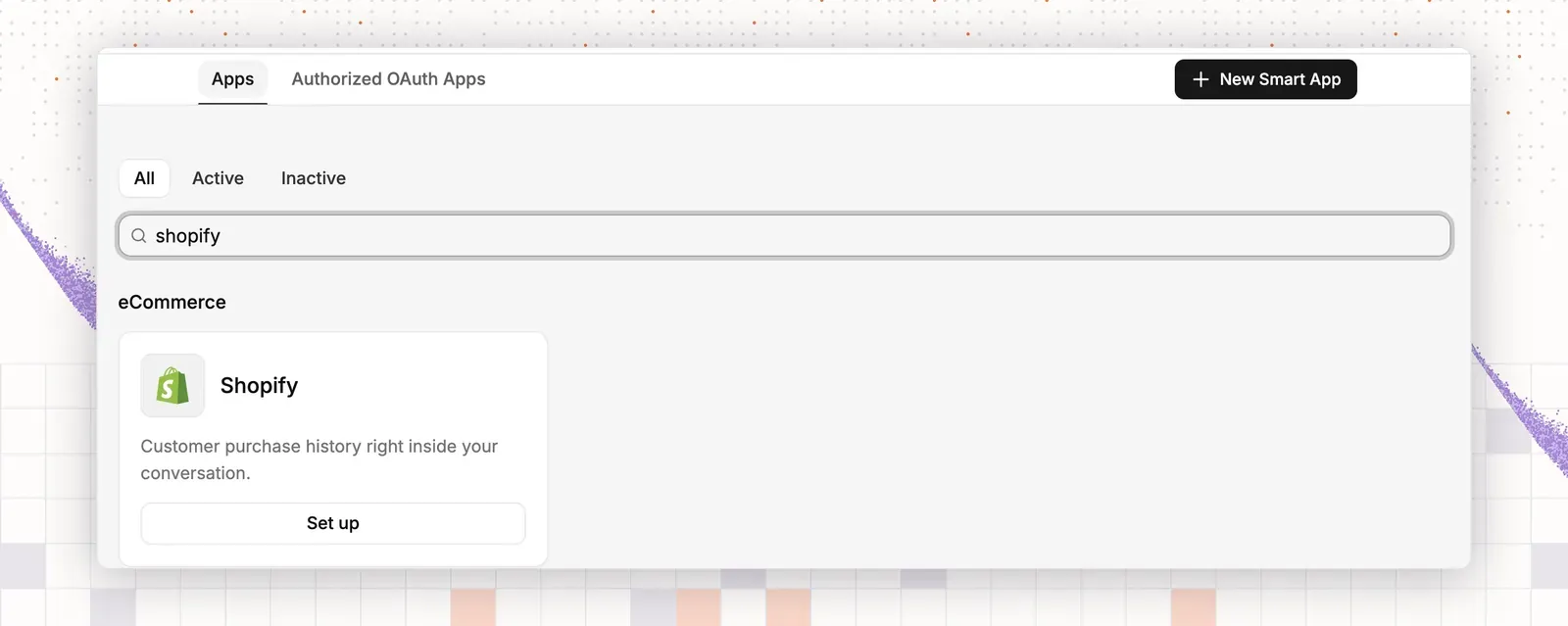
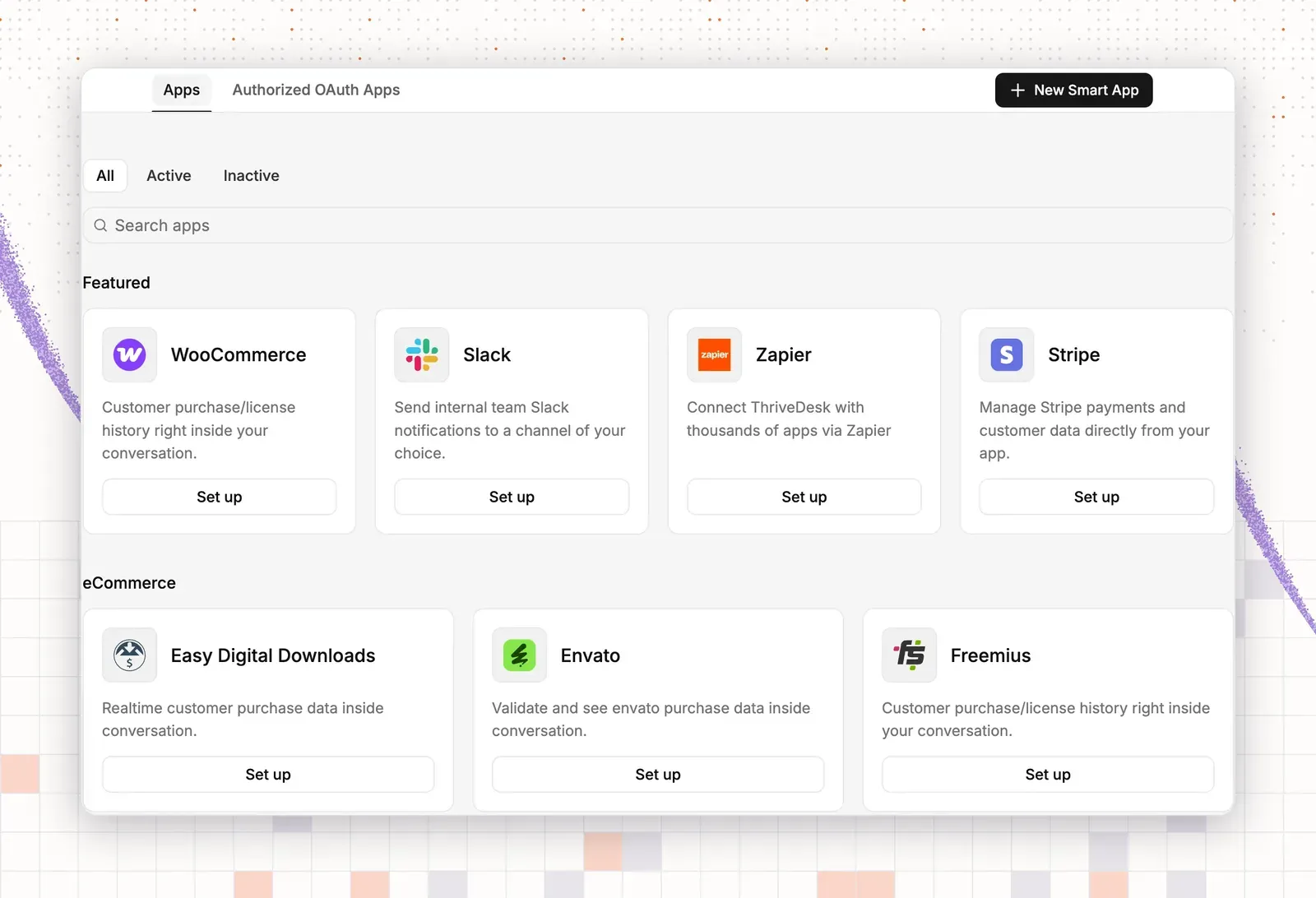
- Open App Store in the left sidebar.
- Online store: install the Shopify or WooCommerce app. WooCommerce also needs the ThriveDesk plugin.
- Software company: install the app that holds your customers’ purchases, such as Freemius, Easy Digital Downloads, SureCart, Stripe or Paddle. Add Slack for team alerts.
- Choose the inboxes for the app.
Result: order or purchase details appear beside each conversation.
Step 2: add what the AI agent should know
- Click Neo in the left rail.
- Under Train, add a Doc source for your help center.
- Add a Website source for your returns, shipping, billing and plan pages.
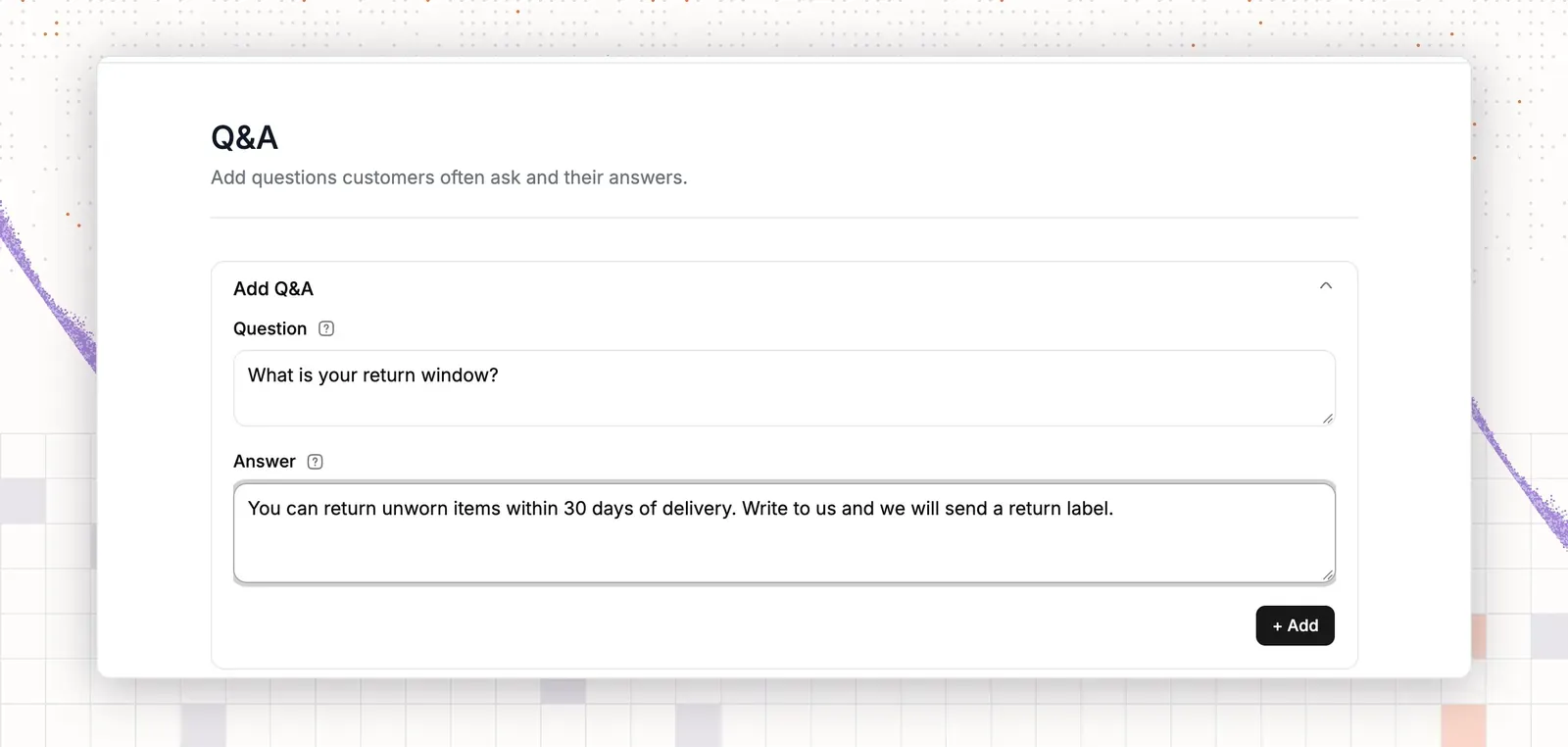
- Add Q&A items for your top ten questions.
Result: asking “What is your return window?” or “How do I reset my password?” in Preview & Simulations quotes the right page.
Step 3: write how it should sound
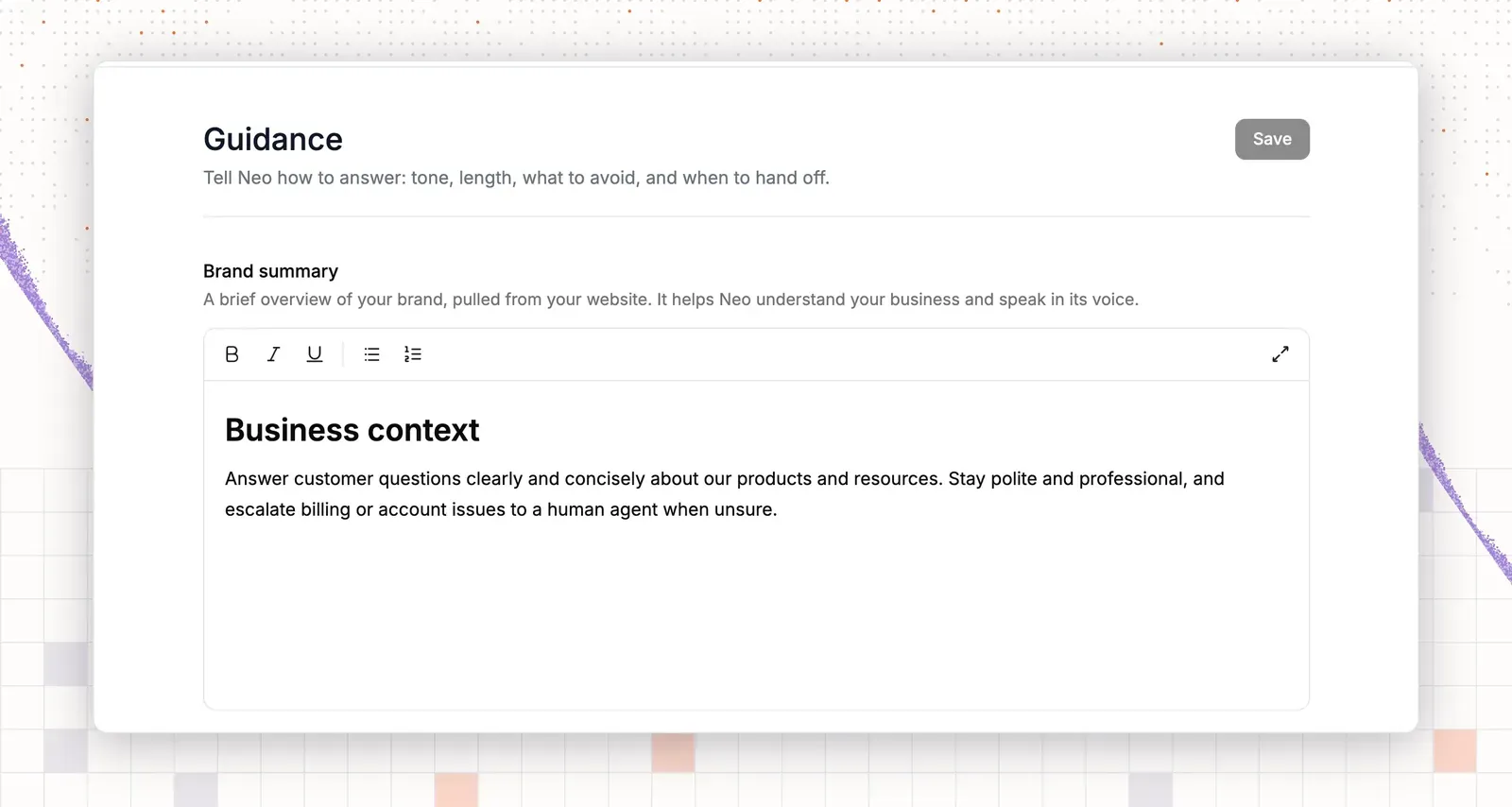
- Open Guidance in Train.
- Set the tone.
- Set the answer length.
- Add the rule “Never promise a refund date.”
- Add the rule “Never ask for a card number or a password. Send payment questions to the checkout page.”
- Add the rule “For refund and plan change questions, say a teammate will confirm.”
- Select Save.
Result: asking “When will I get my refund?” gives no date and says a teammate will confirm.
Step 4: choose what it can do
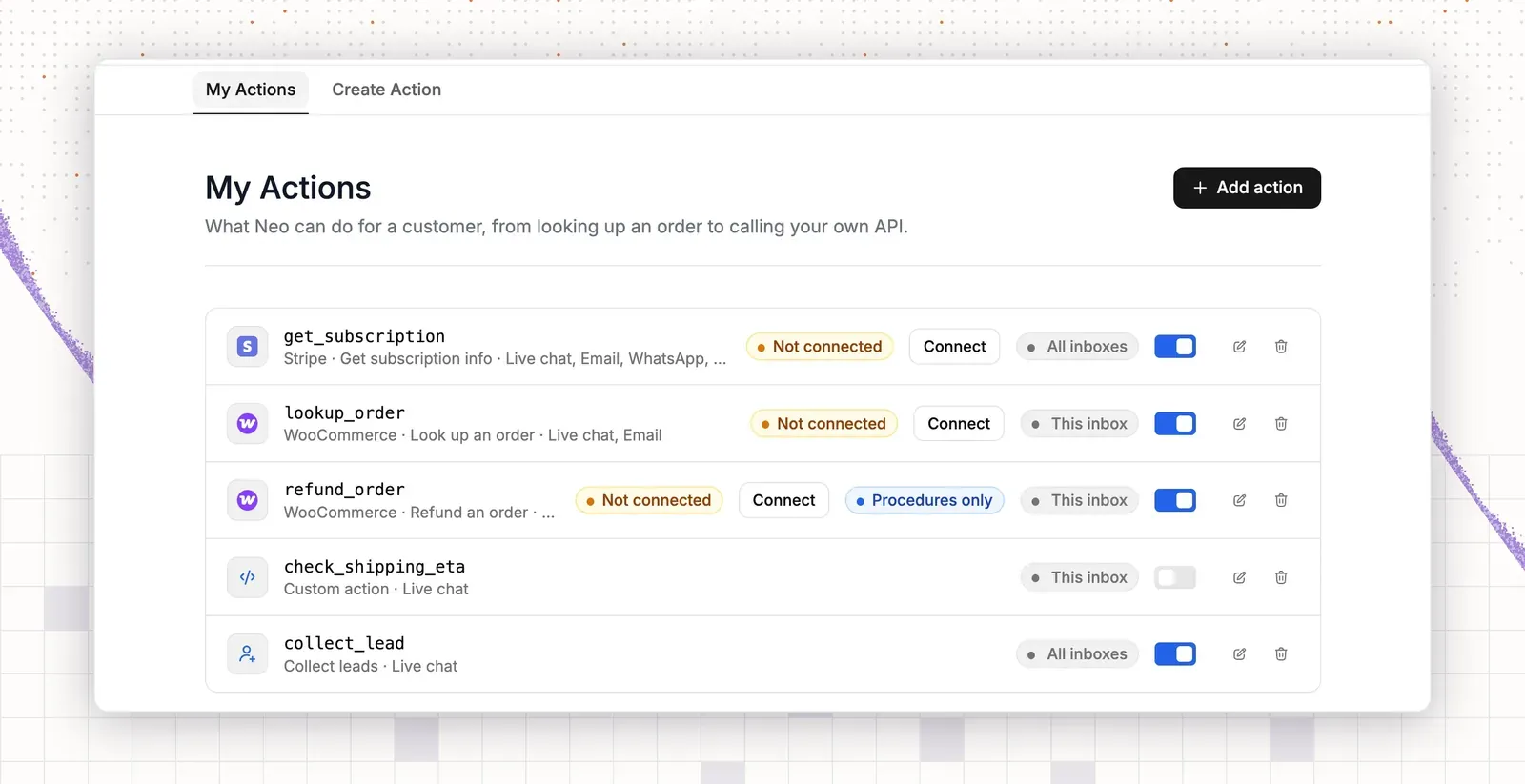
- Open Actions in Train.
- Select Add action.
- Choose the app you connected in Step 1.
- Pick the action that looks up an order or a purchase.
- Leave other actions off until you trust the agent.
Result: asking “Where is my order?” or “Which plan am I on?” in Preview & Simulations shows the real status and does not invent a date.
Step 5: set when it hands off to a person
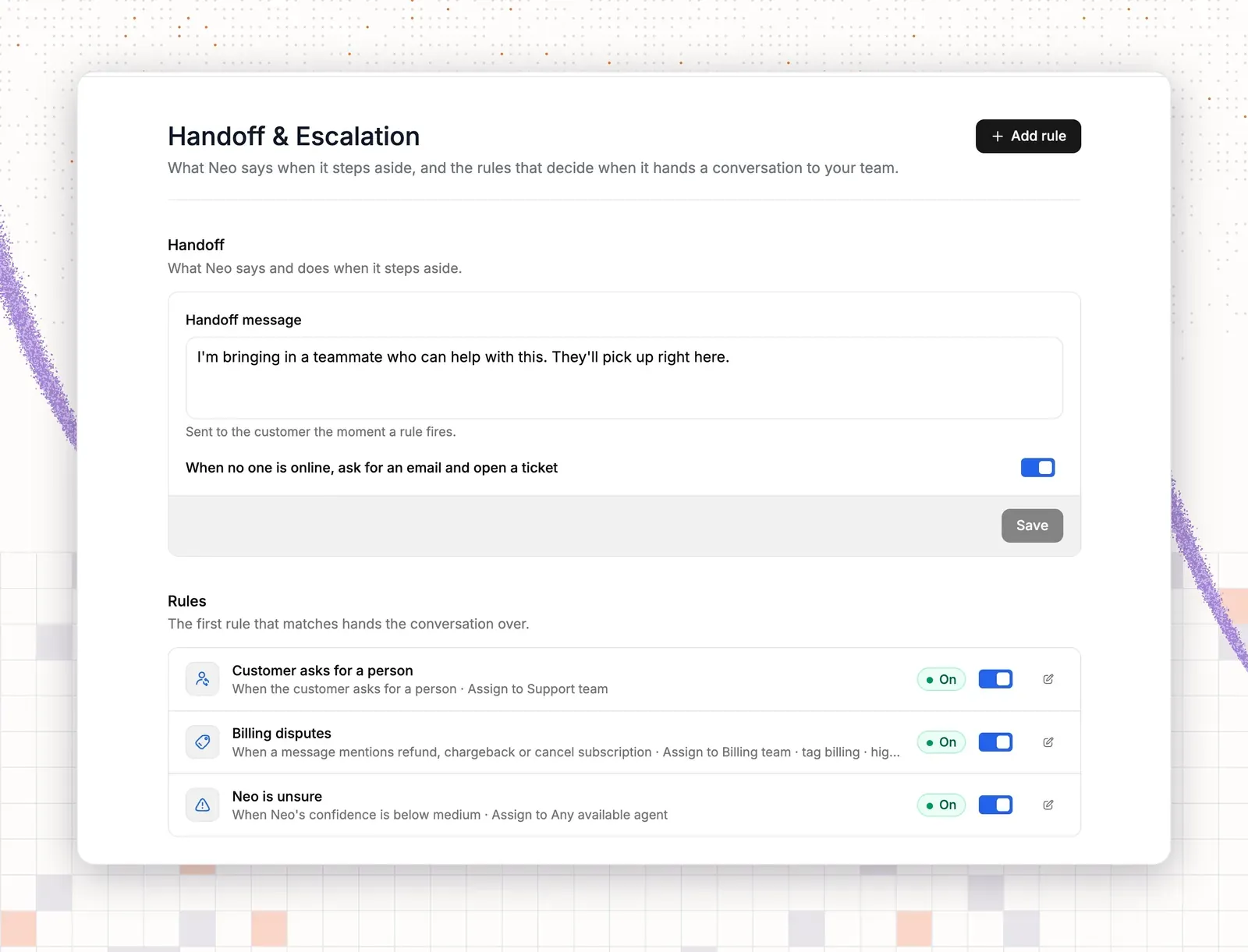
- Open Handoff & Escalation in Train.
- Write the handoff message.
- Turn on When no one is online, ask for an email and open a ticket.
- Select Add rule.
- Under Trigger, choose a message that mentions “refund”.
- Choose the teammate to assign it to. Add a second rule for “cancel” if you sell subscriptions.
Result: a test chat that mentions “refund” appears in your inbox, assigned to that teammate.
Step 6: test
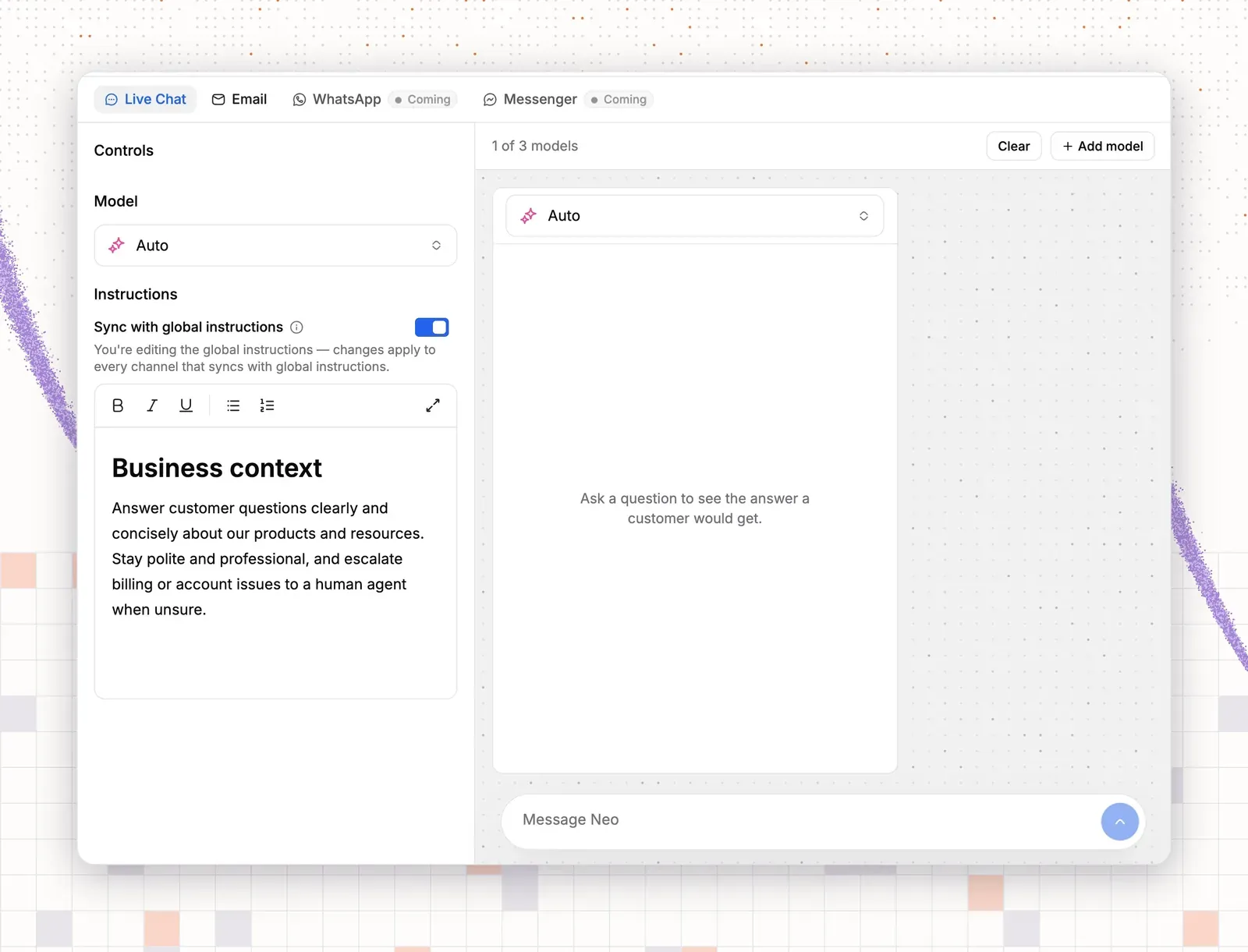
- Open Preview & Simulations.
- Ask an order status question, or “How do I reset my password?”
- Ask about a return, or “Can I switch to the annual plan?”
- Type an angry message.
- Select Improve Answer on a wrong reply.
- Edit the source article, or add a Q&A item for that question.
Result: replies quote your policy and give no invented date or price.
Step 7: go live and review
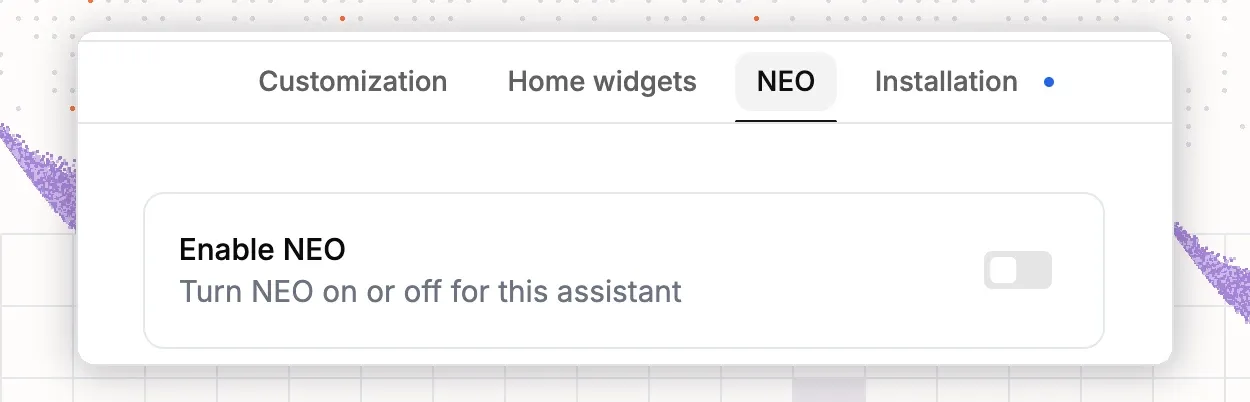
- Go to AI > Deploy > Chat widget.
- Open your widget.
- Select the NEO tab.
- Switch on Enable NEO.
- After one week, open your inbox and read the AI conversations.
Result: the inbox lists each AI conversation. A handoff shows as assigned to the teammate from your rule.