

Canned responses are pre-written replies to the questions your support team answers every day: where an order is, how returns work, why a payment failed. Most help desks store them as saved replies that an agent can insert into a conversation in a few clicks.
What changed is who reads them. In an online store, an AI agent now answers many of the routine questions first, and an AI assistant drafts replies for the team. Both work best from the same clear, approved answers your canned responses already hold. This guide covers what canned responses are for now, how to write them for people and AI, examples for nine ecommerce industries and how to set them up in ThriveDesk.
What is a canned response?
A canned response is a reply you write once and reuse whenever the same question comes back. You’ll also see them called saved replies, canned messages, reply templates or macros. The name comes from “canned” food: prepared in advance, ready when you need it.
A canned response is not an auto-reply. An auto-reply goes out by itself when a message arrives, for example to confirm receipt outside business hours. A canned response is picked for one conversation, by a person or by AI, and it can be edited before it’s sent.
It’s also not the same as an AI answer. An AI agent writes a new reply each time from its sources. A canned response is fixed text that your team approved. In practice, stores now use all three together, and the canned responses keep the other two honest.
What canned responses are for now that AI answers first
For years, the main argument for canned responses was speed. Agents typed less, so customers waited less. Speed still matters, but in a store where AI handles order-status and tracking questions, canned responses do three other jobs.
Approved wording for handoffs. The conversations that reach a person are the harder ones: a late parcel, a refund outside the window, an angry customer. A good saved reply gives the agent a calm, correct starting point, so they spend their attention on the customer instead of on wording.
Source material for the AI. An AI assistant that drafts replies needs examples of how your store answers. Your canned responses are short, specific and already approved, which makes them good material to learn from.
One place the policy lives. When the returns window changes from 30 to 14 days, someone must update every place that says 30. If the saved reply is the single source, the team, the help center and the AI all change together.
How canned responses help train AI
AI support tools learn from what you give them. In ThriveDesk, the AI assistant that drafts replies for your team can use your saved replies as sources, next to help articles and past conversations. Neo, the AI agent that answers customers, learns from training sources such as Q&A pairs, files, help articles and your website.
That means a saved reply is often only a small step away from AI training data. The answer to “Where is my order?” that your team sends every day can also be a Q&A pair for the AI agent. The question stays the same, and the answer states the same policy.
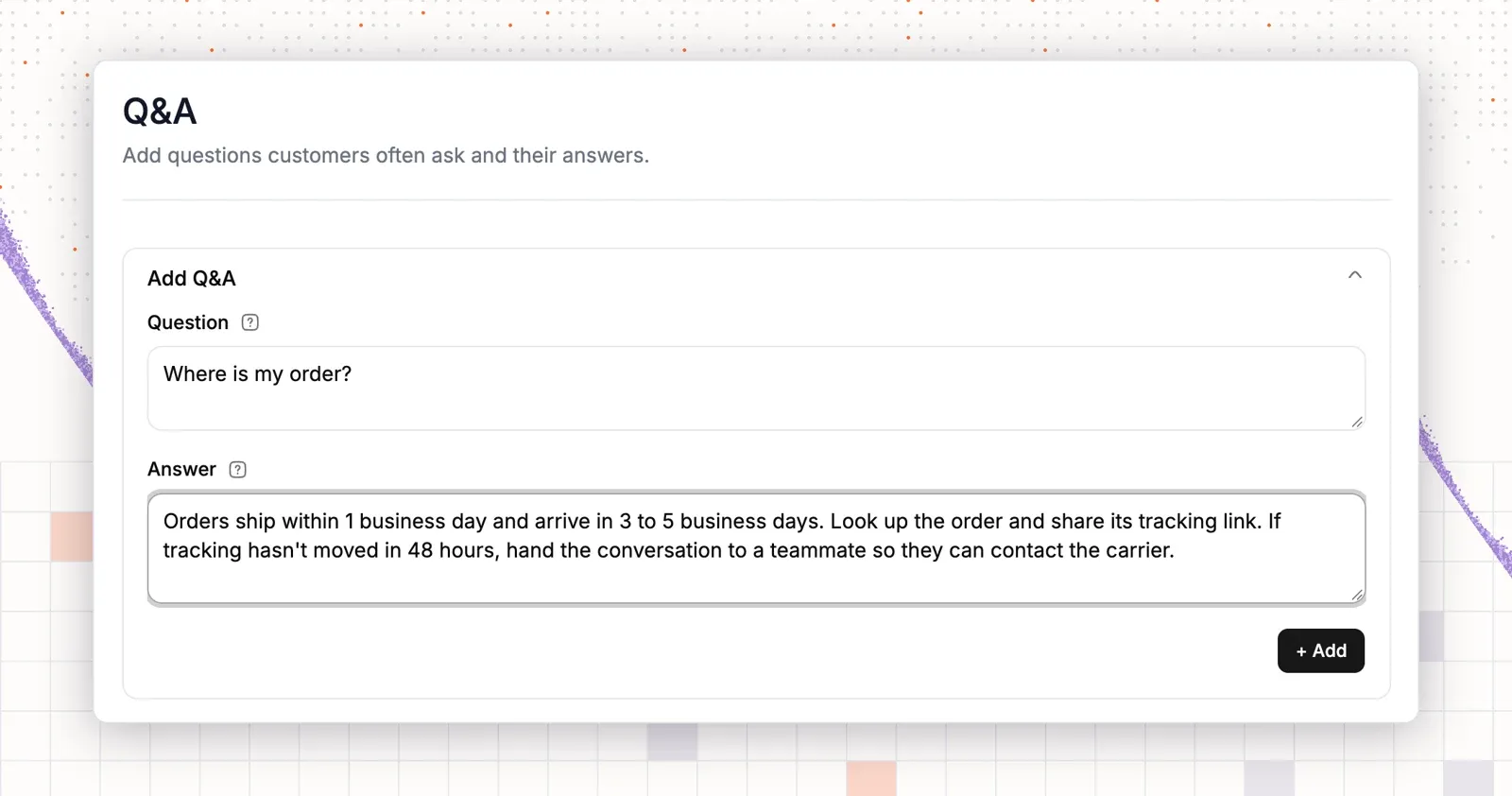
Two things change when you write for AI. First, the AI can’t ask a colleague what “the usual window” means, so the reply must say “14 days from delivery”. Second, the AI repeats mistakes at scale. One outdated reply used to cause a few wrong emails. Now it can feed a wrong answer into hundreds of conversations before anyone notices.
In practice, treat the canned response library as the place where answers get approved. Copy a reply into AI training only after the team has sent it and customers didn’t come back confused. That’s the AI reply drafting loop: the team approves the answer, the AI reuses it and the team reviews what the AI sends.
How to write canned responses for people and AI
A reply that works for both readers is short, specific and complete. These six rules cover most of it.
Write one answer per question
Each reply should answer one question. “Order delayed” and “Order lost” need separate replies, because the next step is different. A reply that tries to cover both makes the agent delete half of it and leaves the AI unsure which half applies.
State the policy with its numbers
Write “Returns are free within 30 days of delivery for unworn items with tags”, not “We have a generous returns policy”. Include the numbers, the conditions and the exceptions. A person can soften the wording; the AI needs the facts.
Add variables for names and order details
Use variables for the customer’s first name and, where your help desk supports it, conversation and inbox details. A reply that starts with the customer’s name doesn’t read like a template. Leave a clear gap where the agent adds one sentence about this order.
Keep tone notes out of the reply
Notes such as “be extra polite here” belong in the reply’s name or in your AI guidance, not in the text. If they sit inside the reply, they get sent to customers, and the AI may read them as part of the answer.
Name replies so anyone can find them
Use a “Topic — Question” pattern, such as “Returns — Item arrived damaged”. Agents find replies by searching, and a clear name also tells the AI what the reply is for. Avoid names like “Reply 7” or “Sarah’s refund one”.
Review them after every policy change
Put a review on the calendar every quarter, and run one the same day a policy changes. Delete replies nobody used, merge near-duplicates and check every number. If you write apology replies, check that each one still offers something the team can actually do.
Canned response examples by industry
These examples use {first name} as a variable. Copy them into your shared inbox, change the numbers to match your policy and add one sentence about the customer’s order before you send.
Clothing and apparel
Sizing and exchanges fill most clothing store inboxes.
Sizing question:
Hi {first name}, our size guide on each product page lists chest, waist and hip measurements in inches and centimetres. If you’re between sizes, go one size up for this style. Send me your usual size in another brand and I’ll check it for you.
Exchange for a different size:
Hi {first name}, happy to swap that for you. Start the exchange from your order page and pick the new size. We ship the new item as soon as the return is scanned by the carrier, so you don’t wait for it to reach us.
Beauty and cosmetics
Beauty stores get ingredient and reaction questions that need care.
Ingredient question:
Hi {first name}, the full ingredient list is under “Ingredients” on the product page. This formula is fragrance-free and doesn’t contain parabens. If you have a known allergy, send me the ingredient name and I’ll check it against the list.
Skin reaction:
Hi {first name}, I’m sorry about the reaction. Please stop using the product and rinse the area with cool water. We’ll refund this order in full. You don’t need to return the item. If the irritation continues, please see a doctor.
Food and beverage
Shelf life and damaged deliveries come up most for food and drink stores.
Arrived damaged or melted:
Hi {first name}, I’m sorry your order arrived like that. Please send a photo of the package and the damaged items. I’ll send a replacement in the next shipment, or a refund if you prefer. You don’t need to send anything back.
Shelf life:
Hi {first name}, the best-before date is printed on the bottom of each pack. Unopened, this product keeps for 9 months in a cool, dry place. Once opened, keep it sealed and use it within 4 weeks.
Health and wellness
Health and wellness stores need replies that stay inside what the label says.
Is it safe with my medication?
Hi {first name}, we can’t give medical advice, so please check with your doctor or pharmacist before you take this with other medication. The full label, including the dosage and ingredients, is in the product images. Happy to send it as a PDF if that helps.
Subscribe and save:
Hi {first name}, a subscription saves 10% on every order, and you can skip, pause or cancel from your account at any time. Your next delivery date is shown on the subscriptions page.
Home and garden
Home and garden stores handle large items and assembly.
Delivery of a large item:
Hi {first name}, large items ship with a freight carrier who will text you to book a delivery slot. Delivery is to the ground floor or front door. If you need it brought inside, reply and I’ll check the options for your postcode.
Missing part:
Hi {first name}, sorry about the missing part. Tell me the part number from page 2 of the instructions, and I’ll ship it today at no cost. You don’t need to return anything.
Consumer electronics
Electronics stores answer setup and warranty questions.
Device won’t turn on:
Hi {first name}, let’s try two quick steps. Charge the device for 30 minutes with the cable in the box, then hold the power button for 15 seconds. If it still doesn’t start, reply with your order number and I’ll set up a replacement under warranty.
Warranty claim:
Hi {first name}, your device has a 12-month warranty from the delivery date. Send me the order number and a short video of the problem. Once I confirm it, we’ll ship a replacement and send a prepaid label for the faulty one.
Jewelry and luxury
Jewelry stores get questions about materials, sizing and high-value deliveries.
Ring resizing:
Hi {first name}, we resize rings for free within 60 days of delivery. Use the prepaid label on your order page, and we’ll return the ring in the new size within 10 business days, fully insured.
Signature on delivery:
Hi {first name}, orders over $500 need a signature on delivery so they can’t be left at the door. If no one is home, the carrier leaves a note and tries again the next business day.
Pet supplies
Pet supply stores get diet changes and repeat orders.
Switching food:
Hi {first name}, we recommend switching over 7 days: mix a little of the new food into the old one each day until it’s all new. If your pet has a sensitive stomach, ask your vet first. Unopened bags can be returned within 30 days.
Pet didn’t like it:
Hi {first name}, picky eaters happen. If the bag is less than half used, we’ll refund it under our happy-pet promise. Reply with your order number and a photo of the bag, and I’ll process it today.
Subscriptions
Subscription stores answer billing and skip questions most.
Skip a delivery:
Hi {first name}, you can skip any delivery from your account page up to 3 days before it ships. If you’d like, tell me which month to skip and I’ll do it for you now.
Unexpected charge:
Hi {first name}, this charge is your monthly renewal, which runs on the same date each month. If you meant to cancel, I can refund this charge as long as the box hasn’t shipped yet. Just confirm and I’ll take care of it.
Common canned response mistakes
Most problems come from the library as a whole, not from any single reply.
- Too many replies. A library of 300 replies is hard to search, and agents stop using it. Start with 15 to 25 and add one only when a question repeats every week.
- Vague policy. “Contact us within a reasonable time” forces the agent to guess and leaves the AI nothing to quote. Write the number.
- Pasting without reading. Two replies pasted together answer three questions the customer didn’t ask. Read the customer’s message again before you send.
- Stale replies. An old shipping time in one reply can now spread through AI drafts. Review the library on the same day a policy changes.
- Wrong channel. A four-paragraph email reply feels heavy in live chat. Keep a short chat version of the replies you use most.
What to measure
| Metric | What it shows | What to look for |
|---|---|---|
| First response time | How fast customers get a first reply | It drops once common questions have a reply ready |
| Reply usage | Which canned responses the team uses | Replies with no use in three months can go |
| Edit rate | How often agents rewrite a reply before sending | High edits mean the reply needs rewriting |
| Reopen rate | Conversations that come back after a reply | Repeat contacts on one topic point to an unclear reply |
| Customer satisfaction | How customers rate the conversation | Scores on templated topics should match the rest |
| AI answer accuracy | How often AI answers on the same topics are right | Wrong answers usually trace back to an outdated source |
For more on the first metric, see these ways to cut response time.
How to add canned responses in ThriveDesk
ThriveDesk is AI customer support for online stores, with saved replies, a shared inbox, live chat and a help center on every plan. Here’s how to set up a canned response and use it with your team and with Neo.
Step 1: Create the reply
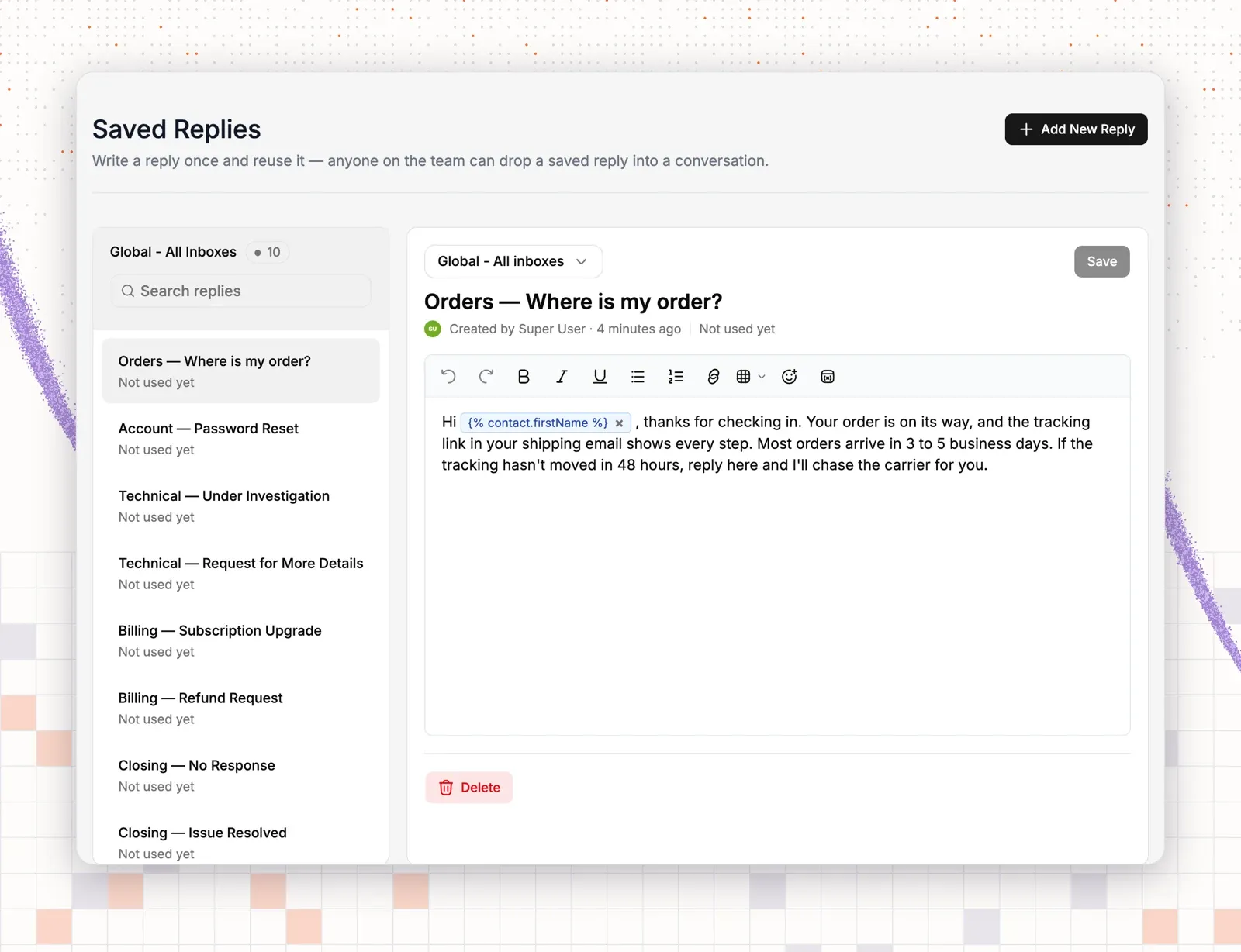
Go to Settings → Saved Replies and click Add New Reply. Pick the inbox the reply belongs to, or keep Global - All inboxes so every team can use it. Give it a “Topic — Question” name, write the reply and save. The list on the left shows each reply and how often the team uses it.
Step 2: Add variables
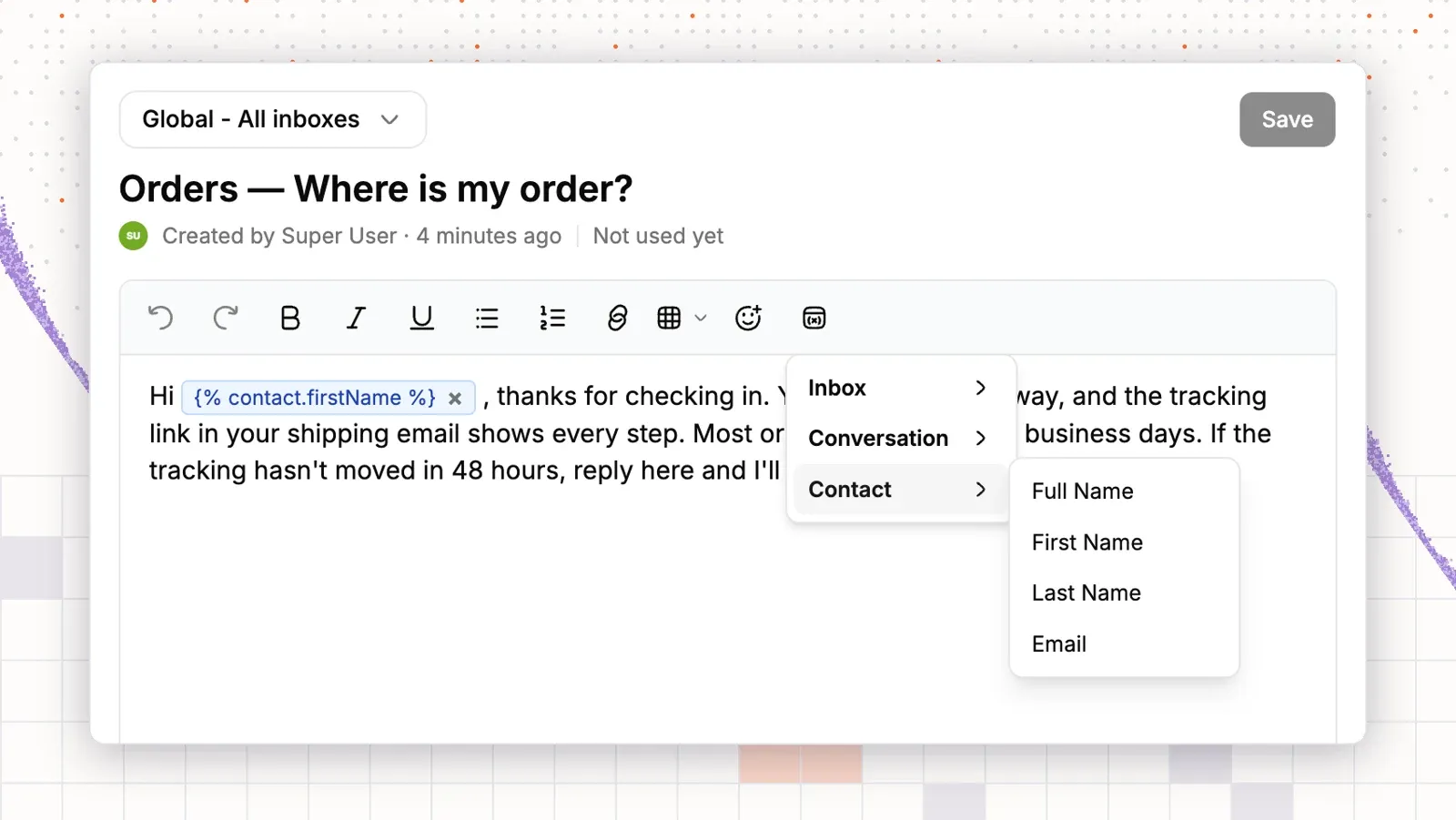
Click the variables button in the editor toolbar and pick a field from Inbox, Conversation or Contact, such as the customer’s first name. ThriveDesk fills it in from the conversation when the reply is inserted.
Step 3: Insert it in a conversation
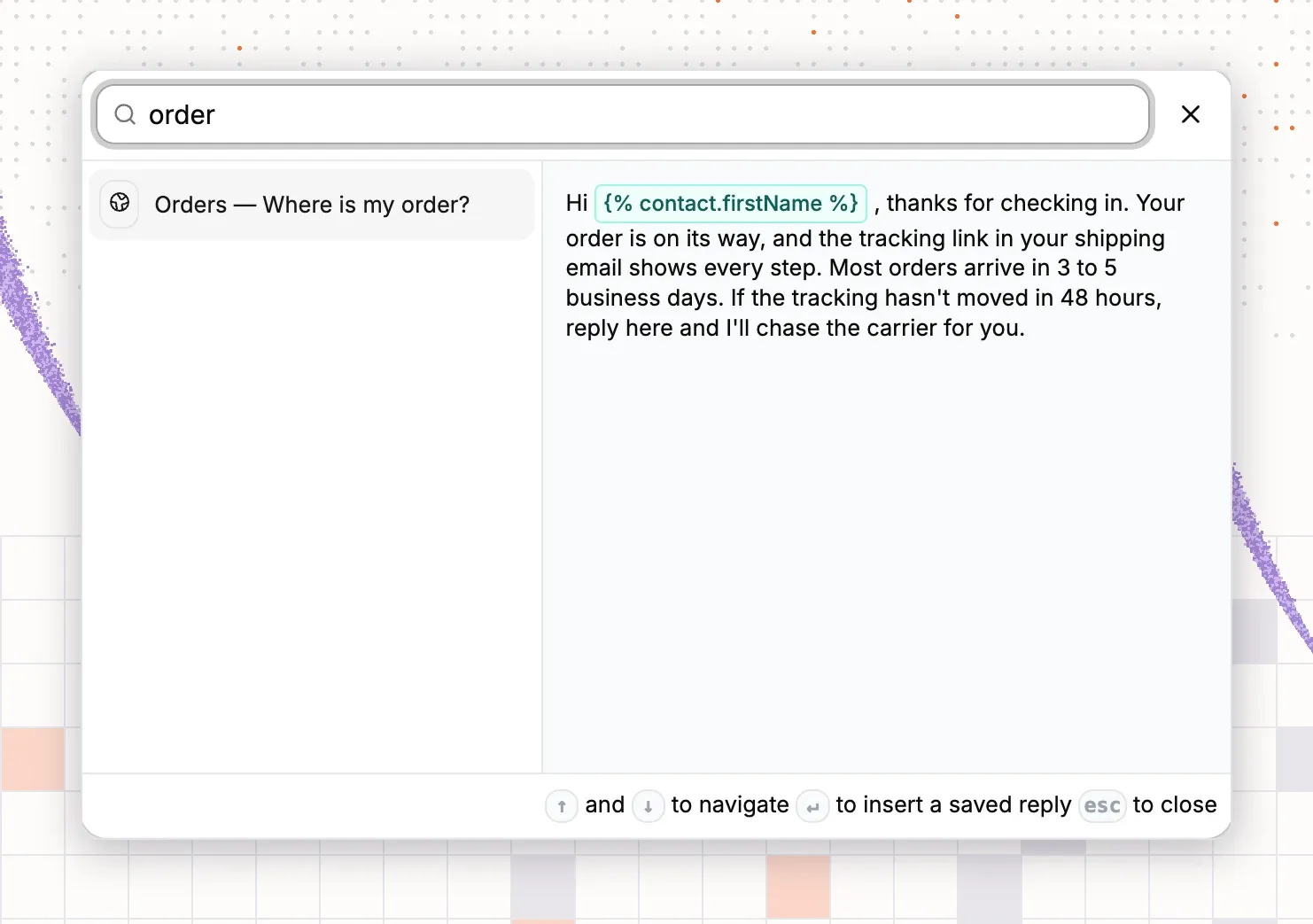
In the reply box, click the saved replies button and search by name. The preview shows the full reply with its variables before you insert it. Press Enter to add it, change what you need and send.
Step 4: Teach the same answer to Neo
Open Neo → Train → Q&A and add the customer’s question with the approved answer. Neo then answers that question on your chat widget and email, and hands the conversation to your team when the answer isn’t enough. The AI assistant that drafts replies for your team also draws on your saved replies, so both stay consistent.
All of this is included on every plan. Basic is $29 a month for two teammates, Standard is $69 for five and Unlimited is $129 for your whole team, with no per-agent fee. See the pricing page or the saved replies feature for details.