All updates
Mobile
Disable Auto-Advance Ticket and Android App Update
Turn off auto-advance so you stay on the current ticket after replying. The Android app also gets real-time WebSocket syncing and new filters for tags and teammates.
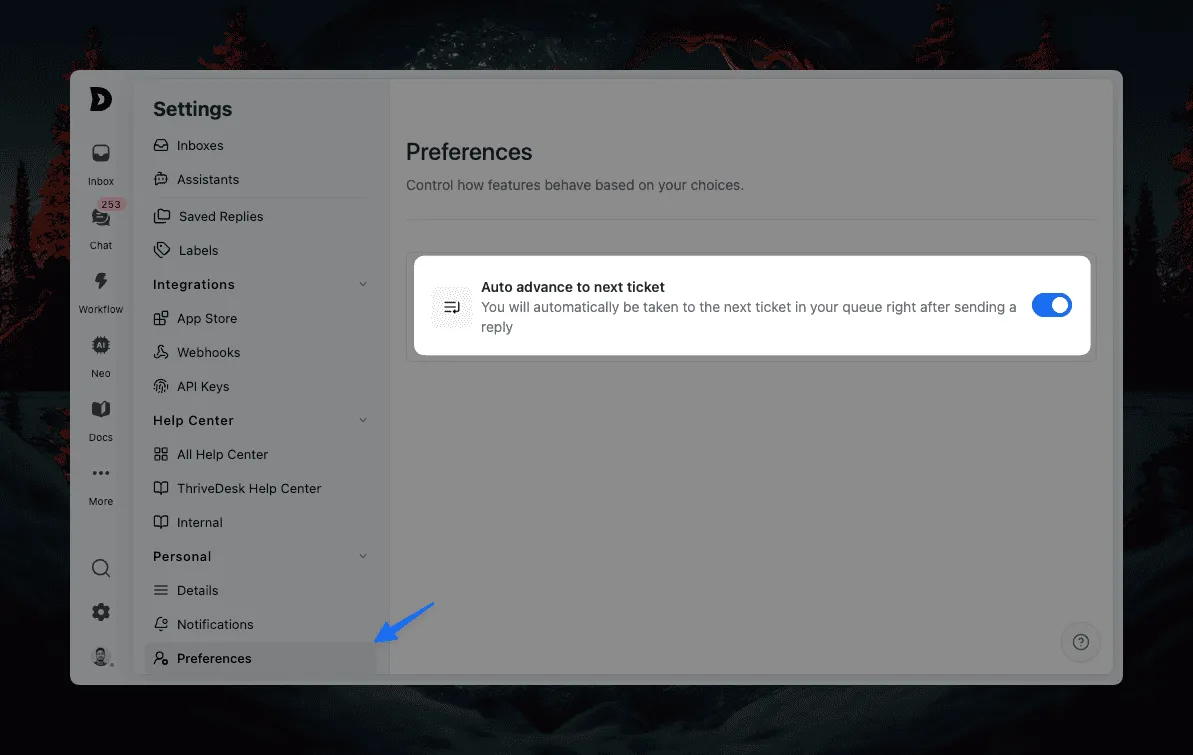
Disable Auto-Advance to Next Ticket
By default, after you send a reply, ThriveDesk can automatically move you to the next ticket in your queue. This is designed to speed up high-volume support workflows where agents are moving quickly through many tickets.
For teams that prefer more control, you can now disable auto-advance. Header over to Settings > Personal > Preferences to disable the option.
Mobile App – Android
- Dashboard now stays in sync even when data mismatches occur.
- Real-time updates are powered by WebSockets for smoother performance.
- Added filters for tags and teammates, making it easier to narrow down conversations.
- Improved thread message rendering for a more consistent experience.
- Resolved issues where threads or notifications sometimes appeared blank.
Improvements
- More refinements to message rendering for better readability.
Bug Fixes
- Fixed dark mode inconsistencies across the app.
- Fixed tag search issues on the conversation page.




