
“Happy to help” means “you’re welcome” or “I’m glad to do this”. It is a polite phrase, and it is fine once. In customer service it often goes flat, because it fits every ticket and says nothing about this one. If the reply also needs an apology, see better ways to say sorry for the inconvenience.
This guide has 20 better ways to say it, sorted by situation. Half suit software teams: login, billing, bugs and onboarding. Half suit online stores: orders, delivery, returns and refunds. You also get two before and after chats, chat and email templates, and a setup guide for saved replies and an AI agent.
What the phrase means and its synonyms
“Happy to help” is a friendly way to say “you’re welcome”. It can also mean “I’ll gladly do that”, as in “Send me the file, happy to help”. It fits three places in a reply: the first line (“Hi Sam, happy to help with this”), a reply to a thank-you, and a short answer to a simple question.
Close synonyms differ in tone:
- “No problem” is the most casual.
- “Glad to help” is warm and plain.
- “Here to help” is open and friendly, and works as a greeting.
- “Delighted to help” is formal and a little heavy.
- “Glad to assist” and “happy to assist” sound like a script.
- “My pleasure” is polite and a bit formal.

Why it falls flat in support
Customers write in with a problem. They want to know whether you understand what went wrong, whether it is fixed, and what happens next. “Happy to help” answers none of them.
The same words fit a password reset, a lost parcel and a refund, so the line tells the customer nothing about their case. It also sounds like a sign-off, which gives no cue to reply if the fix did not work. A customer who gets it in the third reply on the third ticket hears a template. And “I’m happy” is about the agent’s feelings, so it can sound like a favor for a job you are paid to do. The phrase is a weak default.
To replace it, name the result, then give the next step. Instead of “Happy to help!”, write: “Your refund is on its way. It lands in 3 to 5 days. Reply here if it does not.” The customer knows the outcome, the timing and what to do if it goes wrong.
20 better ways to say “happy to help”
Each line has a short reason and a sample reply. Swap in your own names, dates and order numbers.
Closing a solved ticket
-
“The sync error is cleared.” Name the thing you fixed, and the customer does not need to guess. Sample: “The sync error is cleared. Your dashboard should load now. Tell me if it does not.”
-
“Your replacement ships today.” It fits when an exchange is approved or an item arrived damaged, because it names the outcome and the day. Sample: “Your replacement ships today. Tracking arrives by email within the hour.”
-
“You’re all set.” Use it when nothing else is open. It is short and final in a good way. Sample: “Your plan change is done, and the new price starts on the next invoice. You’re all set.”
First reply or greeting
-
“Thanks for the details, I’m on it.” It shows you read the message, which matters most when the customer sent a screenshot or a log. Sample: “Thanks for the details, I’m on it. I’ll check the export logs and update you by 3 pm.”
-
“I have your order number. Checking now.” It proves you hold the data before you promise anything. Sample: “I have your order number. Checking with the carrier now. I’ll reply here in 20 minutes.”
After a thank-you from the customer
-
“Anytime.” Warm and very short. Save it for a customer you already know, when nothing is left open. Sample: “Anytime. Have a good weekend.”
-
“Glad it worked.” It shares the win without making it about you. When the problem can come back, such as a failed code, add one line that keeps the thread open. Sample: “Glad it worked. Reply here if the discount code fails again.”
Pre-sale question
-
“Yes, and here is the one catch.” Put the answer first and the limit second. A new visitor trusts a plain yes more when the catch comes with it. Sample: “Yes, you can change plans later. Here is the one catch: the new price starts on your next invoice, so there is no mid-month refund.”
-
“Yes, and here is what to know before you order.” This works for size, stock and shipping questions, where the catch is the real answer. Sample: “Yes, it ships to Canada. Here is what to know before you order: delivery takes 6 to 9 days, and duties are paid at the door.”
A bug or outage fix
-
“The fix is live.” It says the work is done. Add the one step the customer must take. Sample: “The fix is live. Log out and back in once, and the error should be gone.”
-
“We found the cause, and it’s resolved.” After an outage, one honest sentence about the cause builds more trust than an apology alone. Sample: “A bad deploy blocked logins from 9:10 to 9:40. We found the cause, and it’s resolved.”
A billing or refund fix
-
“The extra charge is reversed.” For a duplicate charge on a subscription, this line names the money. Sample: “The second charge is reversed. Your bank shows it in 3 to 5 business days.”
-
“Your refund of $64 is issued.” Give the amount and the date. Sample: “Your refund of $64 is issued. Expect it on your card by Friday.”
A return or delivery fix
-
“Your return label is in your inbox.” The customer learns what to do next without asking. Sample: “Your return label is in your inbox. Drop the parcel at any carrier point.”
-
“The carrier shows delivery for Friday.” For a late parcel, a date from a real source beats any reassurance. Sample: “The carrier shows delivery for Friday. If it misses, I’ll ship a replacement.”
A long or hard case
-
“Thanks for sticking with this.” When a case took many replies, it recognizes the customer’s effort. Sample: “Thanks for sticking with this. The patch passed testing and ships tomorrow.”
-
“I’ll check back Thursday.” Use it when you do not have the answer yet. A named day keeps the promise honest. Sample: “I don’t have the supplier date yet. I’ll check back Thursday morning, with or without news.”
Helping a teammate
- “Glad to take a look. Send me the conversation link.” A colleague asks for help with a tricky ticket, and you need the link to see it. The line is warm and asks for the one thing that starts the work. Sample: “Glad to take a look. Send me the conversation link and I’ll check the order notes.”
Professional email and LinkedIn
-
“Glad to help with this.” Calm and plain, so it suits a formal email or a LinkedIn reply. Sample: “Glad to help with this. I’ve attached the overview and can set up a short call if useful.”
-
“Here to help if anything changes.” A closing line for an email, because it leaves the door open without a push. Sample: “The plan is updated. Here to help if anything changes on your side.”
Before and after: two replies side by side
Lines work best inside a whole reply. Each pair below answers the same customer message twice. The left chat uses the stock phrase as the answer. The right chat names the result and the next step.

A software case: login after a password reset
The first reply sounds kind and does nothing. The second names the cause and offers a real next step.
A store case: a late parcel
The second reply gives the status, a date and a plan for the case where the date slips. The customer does not need to write again to find out.
Quick reference: what to say instead
Use this table as a cheat sheet at the desk.
| Situation | Instead of the stock line | Why it works |
|---|---|---|
| Solved software ticket | The fix is live. Log out and back in once. | States the result and one step |
| Solved store ticket | Your replacement ships today. | Names the outcome and the day |
| Thank-you from customer | Glad it worked. Reply here if it happens again. | Shares the win and keeps the thread open |
| Pre-sale question | Yes, and here is the one catch. | Answers in the first words |
| Billing fix | The extra charge is reversed. | Names the money |
| Refund | Your refund of $64 is issued. Expect it by Friday. | Gives the amount and the date |
| Delivery problem | The carrier shows delivery for Friday. | Uses a real source and a date |
| Hard case | Thanks for sticking with this. | Recognizes the effort |
| Teammate help | Glad to take a look. Send me the link. | Starts the work |
| Formal email | Glad to help with this. | Calm and brief |
How to say “happy to help” professionally
The phrase is fine in a business email when you add a specific next step. Tone is the risk in a business email. Drop the exclamation marks and the “more than”, and keep the line short. These lines work for email:
- Opening: “Thanks for the details. I can help with this.”
- Closing: “I’m glad this is sorted. Send me a note if anything changes.”
- After thanks: “My pleasure. Let me know if the invoice needs a change.”
- Handing off: “I’ve passed this to our billing lead, Maya. She’ll reply by noon tomorrow.”
On LinkedIn, keep it even shorter: “Glad to help. Send me a message with your question.”

Copy-ready templates
Replace the bracketed parts before you send. Each template follows the same shape: result, then next step. Our canned reply guide covers how to keep a library like this current.
Chat templates
Solved (software): I’ve fixed [the problem]. It should work now. Try [one step], and reply here if it does not.
Thank-you (store): You’re welcome. Your [item] ships [day]. I’ll send tracking to [email].
Delay (software or store): This needs one more day. I’ll write to you by [time] tomorrow with the result.
Email templates
Subject: Your refund for order [number] is issued
Hi [First name],
Your refund of [amount] is issued. It lands on your card in 3 to 5 business days. If it has not arrived by [date], reply to this email and I’ll check with the bank.
[Your name]
Subject: The [feature] bug is fixed
Hi [First name],
The fix for [the bug] is live. Please [one step, such as refresh the page]. Reply here if you still see the error, and I’ll look at your account today.
[Your name]
When the phrase is fine
It works as the first line of a quick chat (“Happy to help. What’s the order number?”), as a reply to a thank-you, in a short answer to a simple question, and in internal chat with a colleague. It also fits when someone asks “can you resend the invoice?” and the invoice is the whole answer: send it and say “Glad to help.”
Keep to one use per conversation. If a next step exists, do not let the phrase be the last line.
Common mistakes
Swapping one cliché for another is the most common mistake. “Delighted to assist” and “more than happy to help” carry the same flat tone with more words. Three exclamation marks in one reply read as forced. A cheerful line on a refusal makes the refusal worse, so be plain and kind. A line with no result, date or step is still filler, even when the wording is new.
For the wider picture on chat, read about live chat support and conversational customer service.
Set up your best lines as saved replies
Saved replies are for your team, and Guidance is for the AI agent. This setup covers both.
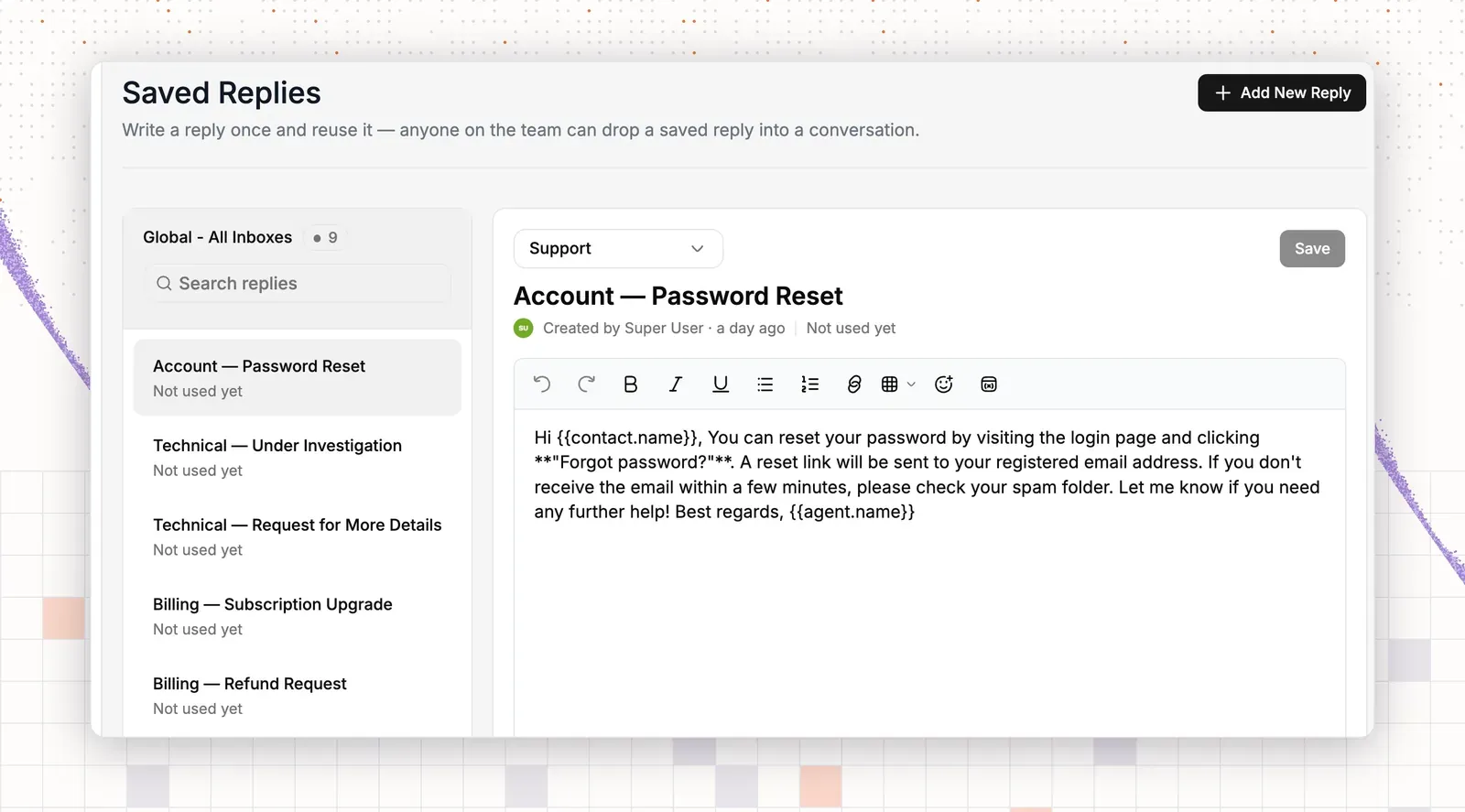
Step 1: Open Saved replies
- Go to Settings.
- Open Saved replies.
The page shows a list of replies with a Search replies box and an Add New Reply button.
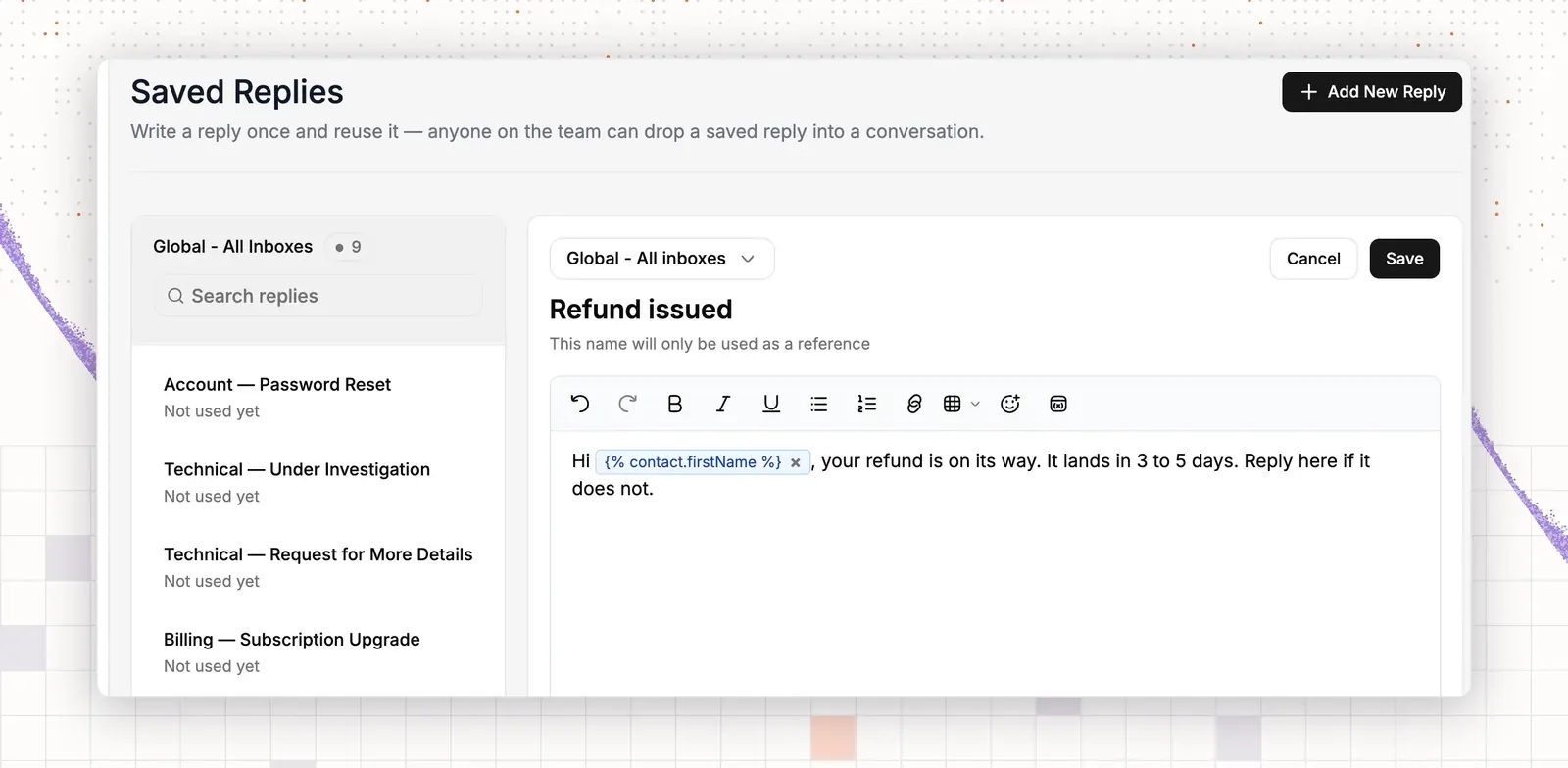
Step 2: Create a reply
- Click Add New Reply.
- In Select inbox, pick the inbox that uses this reply.
- In Name, use the situation, such as “Refund issued” or “Bug fixed”.
- Click the message body and write the line. Keep the result and the next step.
- Add placeholders for the parts that change. Type them by hand, or use the variables button in the editor toolbar. The menu offers inbox, conversation and contact variables. Use
{% contact.firstName %}for the customer’s first name and{% conversation.ticketId %}for the ticket number. Sign the reply with plain text. - Click Save.
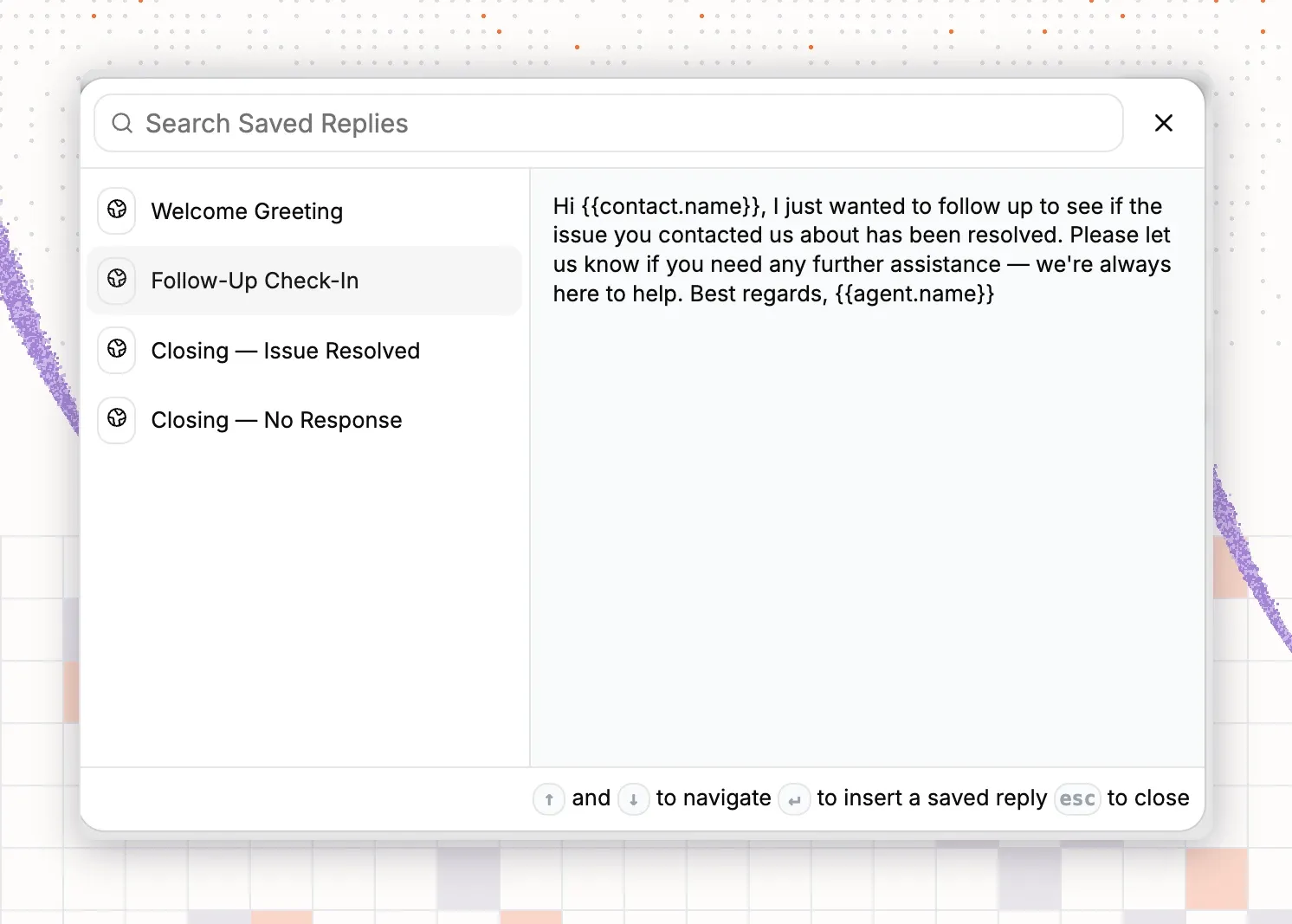
Step 3: Insert the reply in a conversation
- Open any conversation and click in the reply box.
- Open Instant reply. A panel with Search Saved Replies appears.
- Type a few letters of the reply name.
- Move with the arrow keys and press Enter to insert it.
- Edit the line that names the result.
- Send the reply.
Step 4: Save five approved lines
Pick five lines your team approves, for example lines 1, 2, 7, 10 and 13 above. Save each one as its own reply with a clear name. Then open a conversation, type the first letters of one reply name in Instant reply, and confirm that it appears. Every teammate now finds the five lines by name.
Stop your AI agent from sounding scripted
AI chat agents lean on stock phrases. They open with “Great question!” and close with “Happy to help!” because those lines are safe. They add words and no answer.
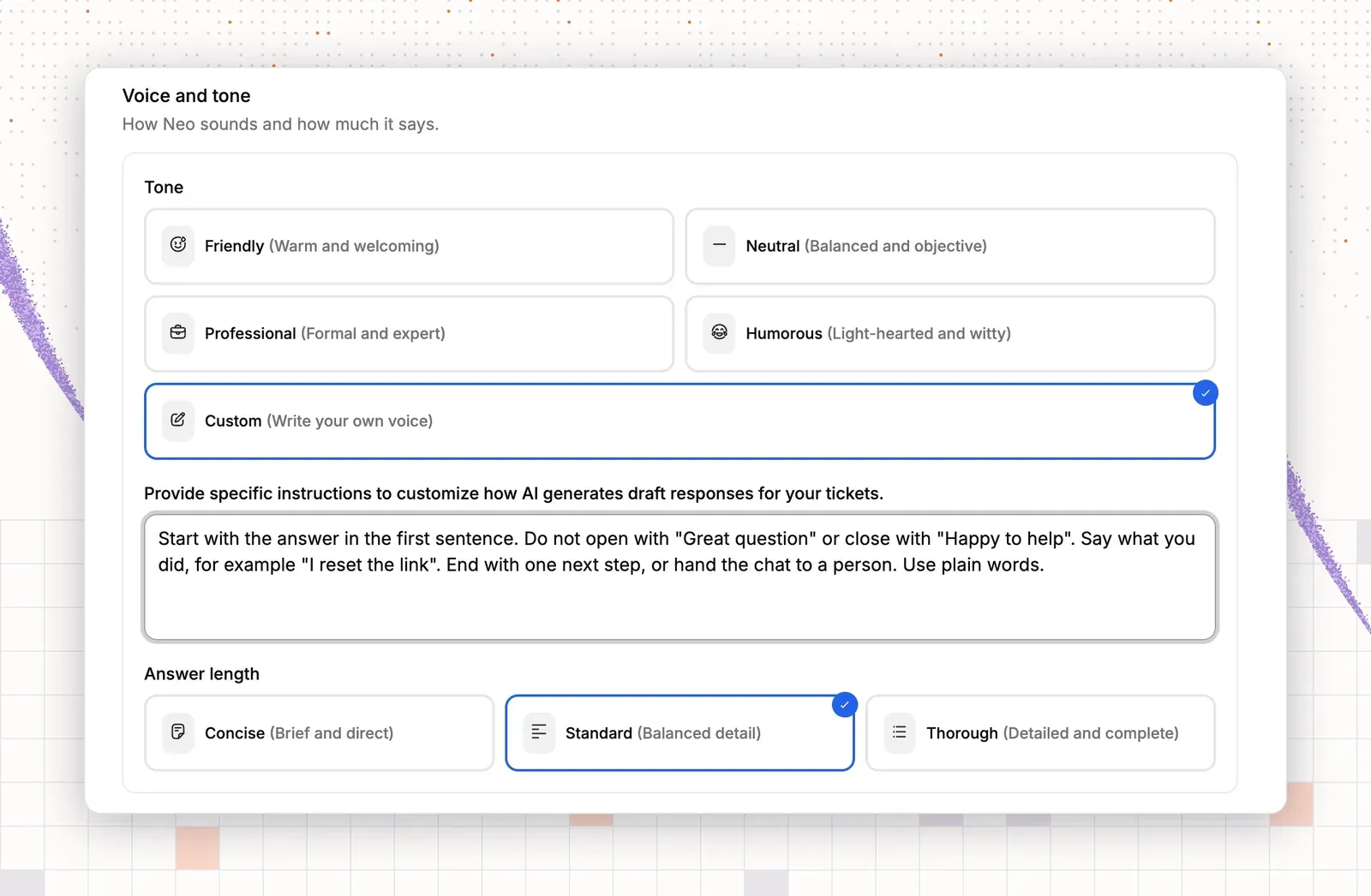
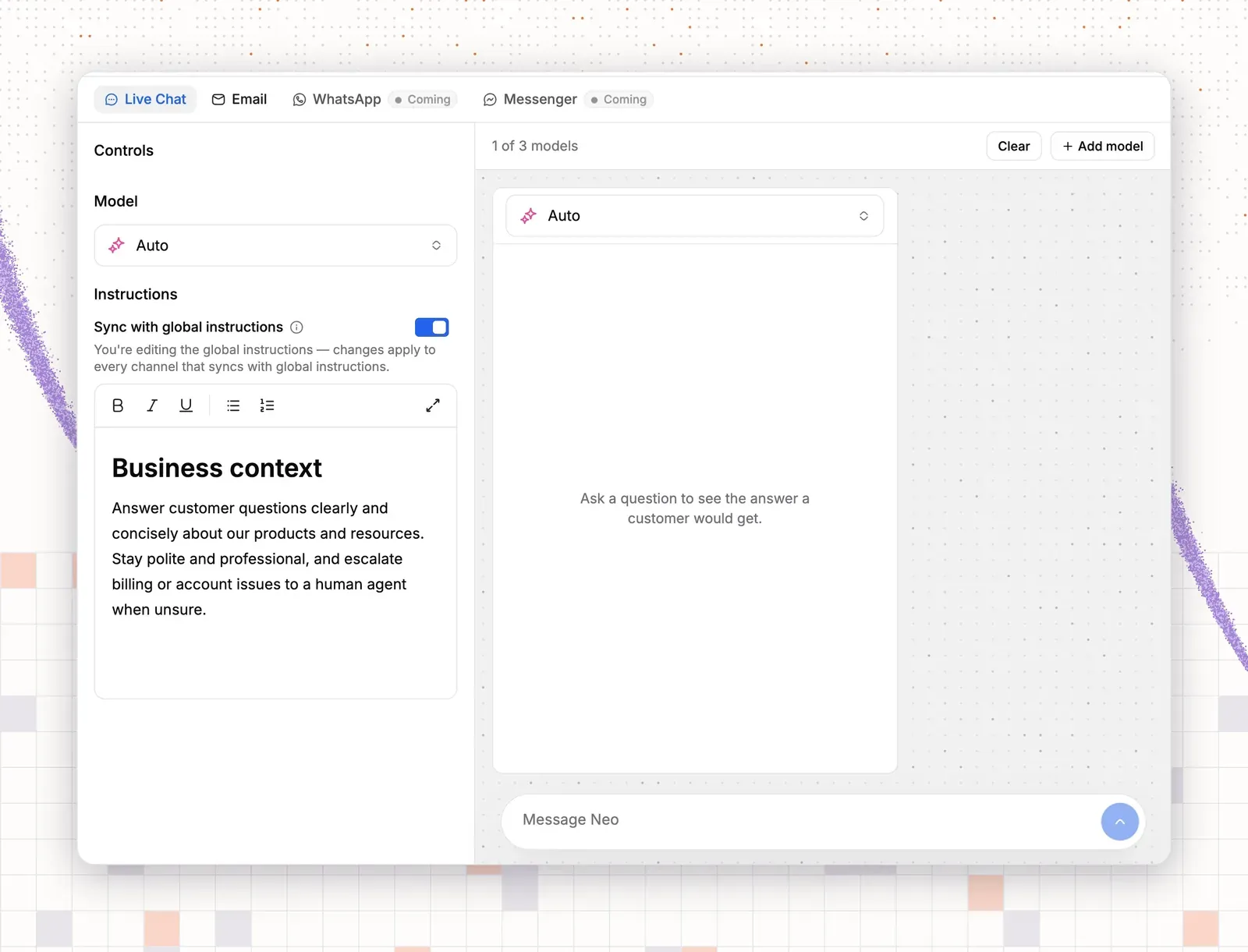
Write one rule: open with the answer, close with a real next step. In ThriveDesk, open the AI agent in the left rail, go to Train and choose Guidance. Then:
- Under Voice and tone, pick Friendly (“Warm and welcoming”) or Professional.
- Under Answer length, pick Concise (“Brief and direct”).
- For full control, pick Custom and paste a short instruction in the text box.
- Click Save.
A custom instruction that works:
Start with the answer in the first sentence. Do not open with “Great question” or close with “Happy to help”. Say what you did, for example “I reset the link”. End with one next step, or hand the chat to a person. Use plain words.
Use Handoff & Escalation in the same left rail to decide when the AI agent passes a chat to a person, such as a refund dispute or an angry customer. Use Preview & Simulations to test the custom instruction with a sample message before customers see it.
The AI agent in ThriveDesk is called Neo. It does not read your saved replies, so match the two by hand. Paste your five approved lines from Step 4 into the Custom instruction as examples of how to close a reply. Guidance and saved replies then sound alike. After launch, read a few conversations in Activity, adjust Guidance, and repeat. For more on how AI chat works, see our post on AI chatbot examples for SaaS and online stores.
How ThriveDesk handles these lines at scale
A good line only helps if the whole team can find it fast. In ThriveDesk, a teammate opens Instant reply in any conversation and searches saved replies by name. The contact placeholders fill in the customer’s first name, so the line reads as written for that person. A software team and a store each build their own set, with names such as “Bug fixed” or “Refund issued”.
The AI agent gets its voice from Guidance, where you choose a tone and add a custom instruction with your approved closing lines. Preview & Simulations lets you test that instruction before customers see it. Activity shows the replies the AI agent sent, so you can spot a stock phrase and fix the instruction. Handoff & Escalation passes a chat to a person when a case needs one, such as a refund dispute. Each team’s replies and its AI agent’s replies then sound alike.
Live chat and the AI agent come with every plan. Plans start at $29 a month for 2 teammates, with a 7-day free trial, and the pricing page lists the rest.